hashRange: randomRange with a Memory
Part 3 of 7 in our series of stdlib primers — the deterministic hash, noise, and shaping functions.
Series: Stdlib Primers
- hash01 — a random number that never changes its mind
- hash11 — the same dice, rolled between −1 and 1
- hashRange (this post) — randomRange with a memory
- smoothstep — the S-curve that turns a cliff into a ramp
- bump — a hill you can put anywhere
- noise — randomness with a smooth ride
- noise2 — a weather map of smooth randomness
What it does
hashRange(n, min, max, seed?) picks a value between min and max —
deterministically, keyed by the whole-number index n. It's
hash01 scaled into your range:
min + hash01(n, seed) * (max - min), exactly.
The pitch is the title of this post: randomRange that keeps its word.
Same idea, same feel, one extra argument — the index that pins the answer.
randomRange(4, 12) re-rolls on every compile; hashRange(i, 4, 12) gives
element i the same answer forever.
One notation note: the result lives in [min, max) — it can land
exactly on min and gets arbitrarily close to max without ever hitting
it. In graphics you will never see the difference, and it has one genuinely
useful consequence: floor(hashRange(i, 0, 3)) divides perfectly evenly
into buckets 0, 1, 2 — no edge case where the answer lands on 3.
Why you'd use it
Two reasons, one practical and one about how you think:
- Migration. If your sketches are sprinkled with
randomRangeand you're tired of the artwork reshuffling every time you save, the rewrite is mechanical: add an index as the first argument, move on with your life. - Ranges read like a spec.
hashRange(i, 35, 125)says "buildings between 35 and 125 tall" — the design intent is in the call. Tightening the numbers tightens the design; the ranges become the tuning panel for the whole piece.
Everything about seeds, determinism, and integer truncation is inherited
from hash01 — this post won't repeat it.
Example 1 — The drop-in swap
Both rows size 40 dots from the same 1.5-to-5 range. The top row asks
randomRange; the bottom asks hashRange with the loop index in front.
//-- The migration in one picture. Top row: dot sizes from
//-- randomRange(1.5, 5) -- they reshuffle on every compile. Bottom row:
//-- hashRange(i, 1.5, 5) -- same call shape with an index in front, and
//-- the sizes are a fixture.

define ViewBox(0, 0, 400, 160);

let labels = TextLayer('labels') #{
  font-family: system-ui, sans-serif;
  font-size: 10;
  fill: #888;
  text-anchor: start;
};
labels.apply {
  text(22, 26)`randomRange(1.5, 5) — reshuffles every compile`
  text(22, 96)`hashRange(i, 1.5, 5) — a fixture`
}

let rolling = PathLayer('rolling') #{ fill: oklch(0.6 0.15 20); stroke: none; };
rolling.apply {
  for (i in 0..39) {
    circle(calc(26 + i * 9), 50, calc(randomRange(1.5, 5)));
  }
}

let pinned = PathLayer('pinned') #{ fill: oklch(0.62 0.16 260); stroke: none; };
pinned.apply {
  for (i in 0..39) {
    circle(calc(26 + i * 9), 120, calc(hashRange(i, 1.5, 5)));
  }
}
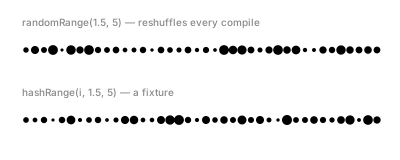
On the page they look equivalent — that's the point; you give up nothing
visually. The difference is behavioral: paste this into the playground
and recompile — the top row reshuffles while the bottom row doesn't
move. (This is the one randomRange appearance in this post; the
contrast is the lesson.)
Example 2 — Skyline
One range per design property. Building height comes from
hashRange(i, 35, 125), width from hashRange(i, 10, 22, 1), and a
subtle facade shade from a third stream.
//-- A night skyline where the ranges read like a spec: buildings between
//-- 35 and 125 tall, between 10 and 22 wide. Tighten either range and the
//-- whole city changes character -- without touching the structure.

define ViewBox(0, 0, 400, 210);

let sky = PathLayer('sky') #{ fill: oklch(0.24 0.05 275); stroke: none; };
sky.apply {
  rect(15, 15, 370, 175);
}

let x = 20;
for (i in 0..25) {
  let w = hashRange(i, 10, 22, 1);
  let h = hashRange(i, 35, 125);
  let shade = Color(0.36 + hashRange(i, 0, 0.1, 2), 0.03, 275);
  if (x + w < 382) {
    let tower = PathLayer(`tower-${i}`) #{ fill: shade; stroke: none; };
    tower.apply {
      rect(x, calc(190 - h), w, h);
    }
  }
  x = x + w + 3;
}
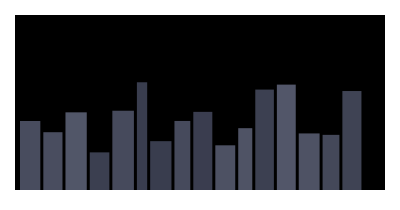
Read the two range calls as the spec they are: "heights 35–125, widths
10–22." Now imagine editing just the height line to (i, 50, 90) — the
towers even out and the same code draws a suburb. That's the tuning-panel
idea: structure stays, character is in the numbers.
Example 3 — Confetti, spec'd
Four properties, four ranges, four seeds — a complete scatter system in four lines: position (x, y), size, and hue.
//-- Four ranges as a spec sheet: where (x, y), how big (r), what color
//-- (hue). Each property reads its own seed; each range line is a design
//-- decision you can tighten or loosen independently.

define ViewBox(0, 0, 400, 190);

for (i in 0..119) {
  let cx = hashRange(i, 22, 378);
  let cy = hashRange(i, 22, 168, 1);
  let r = hashRange(i, 1.5, 5, 2);
  let hue = hashRange(i, 0, 360, 3);
  let c = Color(0.72, 0.16, hue);
  let dot = PathLayer(`confetti-${i}`) #{ fill: c; stroke: none; };
  dot.apply {
    circle(cx, cy, r);
  }
}
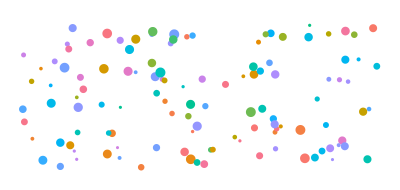
Two things worth copying. First, each property gets its own seed
(0, 1, 2, 3) so streams stay independent — reusing a seed would correlate,
say, size with hue. Second, notice every value is bound to a let before
the drawing call. That's a readability choice, not a requirement (a
calc(...) expression works directly in an argument) — but it's what
makes the four lines read as a spec sheet.
Example 4 — Rain
Ranges can pick categories, not just quantities. Each of 80 streaks
computes floor(hashRange(i, 0, 3, 2)) — an even three-way pick — and the
bucket routes it to a near, middle, or far layer with matching opacity.
//-- Eighty slanted rain streaks. Position and length are ranged picks;
//-- each streak also lands in one of three depth buckets --
//-- floor(hashRange(i, 0, 3, 2)) picks 0, 1, or 2 -- and the bucket sets
//-- the opacity, so the rain reads as near, middle, and far.

define ViewBox(0, 0, 400, 200);

let far = PathLayer('far') #{ stroke: oklch(0.6 0.05 260); stroke-width: 1; fill: none; opacity: 0.25; };
let mid = PathLayer('mid') #{ stroke: oklch(0.65 0.06 260); stroke-width: 1.1; fill: none; opacity: 0.5; };
let near = PathLayer('near') #{ stroke: oklch(0.72 0.07 260); stroke-width: 1.3; fill: none; opacity: 0.9; };

far.apply {
  for (i in 0..79) {
    if (floor(hashRange(i, 0, 3, 2)) == 0) {
      M calc(hashRange(i, 20, 375)) calc(hashRange(i, 18, 150, 1))
      l 4 calc(hashRange(i, 8, 26, 3))
    }
  }
}
mid.apply {
  for (i in 0..79) {
    if (floor(hashRange(i, 0, 3, 2)) == 1) {
      M calc(hashRange(i, 20, 375)) calc(hashRange(i, 18, 150, 1))
      l 4 calc(hashRange(i, 8, 26, 3))
    }
  }
}
near.apply {
  for (i in 0..79) {
    if (floor(hashRange(i, 0, 3, 2)) == 2) {
      M calc(hashRange(i, 20, 375)) calc(hashRange(i, 18, 150, 1))
      l 4 calc(hashRange(i, 8, 26, 3))
    }
  }
}
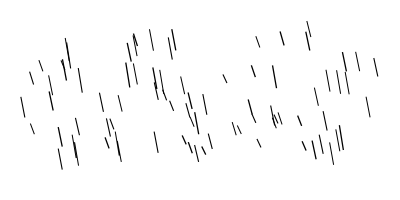
This is the half-open range earning its keep: [0, 3) floors to exactly
{0, 1, 2} with equal shares. The same loop runs in all three layers and
each keeps only its own bucket — a common Pathogen pattern for "one
population, several styles."
Example 5 — Pebble beach
The finale is a tuning exercise. Four overlapping rows of pebbles, back to front; each pebble's width, squash, position, and warmth come from named ranges, and nearer rows draw from bigger width ranges.
//-- Four overlapping rows of pebbles, back to front. Every knob is a
//-- named range: width, squash, and gray-warmth per pebble, with nearer
//-- rows drawing from bigger ranges. Tuning the beach means tuning
//-- ranges -- narrow one row's width range and the rows behind stay put.

define ViewBox(0, 88, 400, 152);

fn pebbleRow(row, y0, minW, maxW, count) {
  for (i in 0..count) {
    let idx = row * 100 + i;
    let w = hashRange(idx, minW, maxW);
    let h = w * hashRange(idx, 0.55, 0.75, 1);
    let x = hashRange(idx, 18, 380 - maxW, 2);
    let L = hashRange(idx, 0.45, 0.68, 3) + row * 0.04;
    let warm = Color(L, 0.02, 75);
    let stone = PathLayer(`pebble-${idx}`) #{ fill: warm; stroke: none; };
    stone.apply {
      roundRect(x, calc(y0 - h), w, h, calc(h / 2));
    }
  }
}

pebbleRow(0, 120, 8, 18, 26);
pebbleRow(1, 155, 10, 24, 22);
pebbleRow(2, 192, 14, 32, 18);
pebbleRow(3, 224, 18, 42, 14);
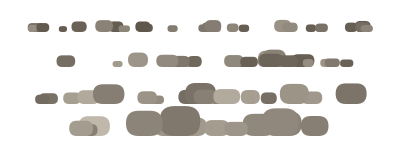
Here's the workflow this function buys you. Suppose the beach feels too
busy: narrow the width range on the front row (18, 42 → 24, 38) and
recompile. Every pebble in the rows behind stays exactly where it
was. With randomRange, that one edit would have re-rolled the entire
beach — you'd be judging a different design, not your adjustment.
Deterministic ranges turn tuning into a controlled experiment.
Where to go next
hash01— the mechanics underneath (seeds, determinism, truncation).hash11— when the natural range is a symmetric ±drift around a center.noise— when neighboring picks should flow into each other instead of being independent.- Reference: Hash & Noise docs.